The problem: qualifying leads at scale
Automate lead qualification with an intelligent agent that evaluates, scores and transfers opportunities to the next step of the sales pipeline , all inside Microsoft Dynamics 365 Business Central.
In any B2B sales team, lead qualification becomes a bottleneck. A salesperson receives dozens of leads daily and needs to manually evaluate whether each one deserves a quote: does the industry fit? is the budget viable? are the requested products part of our catalog?
This manual process has three clear problems:
- Time: Evaluating a lead takes between 5 and 15 minutes. With 30 leads per day, that means hours lost.
- Inconsistency: Each salesperson applies their own criteria. What is a Hot lead for one might be Warm for another.
- Missed opportunities: A lead not contacted within 24 hours has a 60% lower probability of conversion.
The solution: Lead Qualification Agent
We built the Lead Qualification Agent (LQ), a Business Central extension that uses the Agent SDK to automate this process. The agent evaluates each lead across four dimensions, assigns a score from 0 to 100, classifies the lead and — if it is good enough — automatically transfers it to the Quote Builder Agent to generate a quote.
All of this happens inside Business Central, without leaving the platform and without external integrations to maintain.
Architecture: how it works internally
The three pillars of the Agent SDK
The Business Central Agent SDK defines three interfaces that every agent must implement:
IAgentFactory → Agent initial configurationIAgentMetadata → Pages and annotations used by the agentIAgentTaskExecution → How each task is processed (validation + post-processing)
The LQ Agent implements the three through independent codeunits, following the principle of separation of responsibilities:
- LQ Agent Factory Handles the entire agent creation lifecycle, encompassing all necessary steps such as the initial setup pages, agent configuration, and capability validation to ensure optimal functionality and performance.
- LQ Agent Metadata Critical for the operational integrity of the agent runtime and imperative for the customization of the user interface.
- LQ Agent Task Execution Establishes the formal framework for the execution of agent tasks, encompassing rigorous validation protocols, recommendations for user intervention, and the acquisition of contextual data.
The complete task flow
When a qualification is triggered — either from the lead card, a VibeLeads event or a public API call , the following occurs:
1. An agent task is created with a message describing the lead2. Task Execution validates that the message contains qualification keywords3. The agent (GPT-4) opens the lead list from its Role Center4. Navigates to the lead by number, reads its fields and memorizes them5. Validates that the budget is not empty (mandatory field)6. Calculates the weighted score across 4 dimensions7. Assigns the qualification level according to configured thresholds8. If Hot or Warm → calls the Quote Builder API for handoff9. Responds with a structured message: level, score, action taken10. Post-process: adds agent signature and marks the lead as "Qualified By Agent"
Security: three visibility layers
A critical aspect when designing agents is controlling exactly what they can see and do. We implemented a three-layer model:
Layer 1 — Permission Set: The agent can only read customers, contacts and products. It can only modify qualification fields in the Lead table and update KPIs.
Layer 2 — Page Customizations: Three page customizations remove unnecessary actions and fields. The lead list is read-only. The customer card shows only 5 essential fields. The lead card allows editing only qualification fields.
Layer 3 — Profile and Role Center: The agent has its own Role Center with a KPI dashboard and shortcuts to lead management. It sees nothing else.
Scoring: how the agent evaluates a lead
The agent analyzes four business dimensions to calculate a score between 0 and 100:
| Dimension | What it evaluates | Example |
|---|---|---|
| Sector fit | Does the lead’s industry match our verticals? | «Technology» → high score |
| Budget viability | Is the budget sufficient for our services? | €75,000 → viable |
| Product match | Are the requested products in our catalog? | «ERP + Training» → high match |
| Company size | Is the company size appropriate? | «Medium (51-250)» → good fit |
The resulting score determines the qualification level:
| Level | Score | Automatic action |
|---|---|---|
| Hot | ≥ 80 | Immediate handoff to Quote Builder |
| Warm | ≥ 50 | Optional handoff (configurable) |
| Cold | > 0 | No handoff; manual follow-up |
| Disqualified | 0 | Requests user intervention |
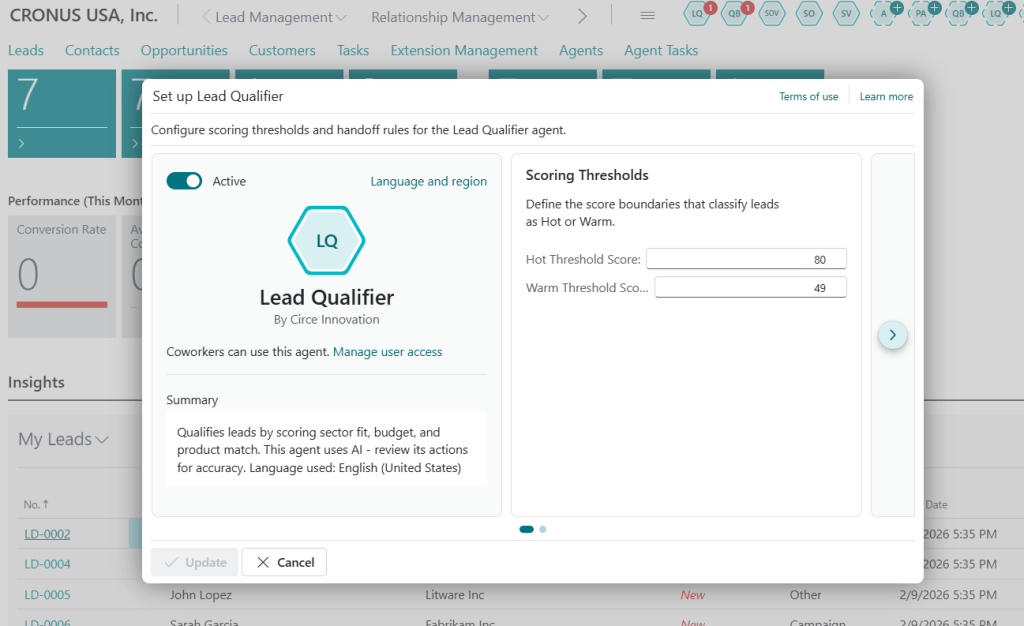
Thresholds (80/50 by default) are fully configurable per agent instance.
Intelligent handoff: agent to agent
One of the most powerful features of the LQ Agent is its ability to automatically transfer qualified leads to the Quote Builder Agent.
[...]procedure HandoffToQuoteBuilder(var Lead: Record Lead)
var

        QBPublicAPI: Codeunit "QB Public API";

        LQSetup: Record "LQ Agent Setup";

        TaskTitle: Text[150];

        MessageText: Text;

    begin

        if not LQSetup.FindFirst() then Error('LQ agent not configured.');

        if IsNullGuid(LQSetup."QB Agent Security ID") then Error('Quote Builder Agent Security ID is not configured in LQ Setup.');

        // Build task message based on qualification level

        case Lead."Qualification Level" of

            Lead."Qualification Level"::Hot:

                begin

                    TaskTitle := CopyStr('Convert Hot Lead ' + Lead."No." + ' to Quote', 1, 150);

                    MessageText := BuildHotLeadMessage(Lead);

                end;

            Lead."Qualification Level"::Warm:

                begin

                    TaskTitle := CopyStr('Review Warm Lead ' + Lead."No." + ' for Quote', 1, 150);

                    MessageText := BuildWarmLeadMessage(Lead);

                end;[...]
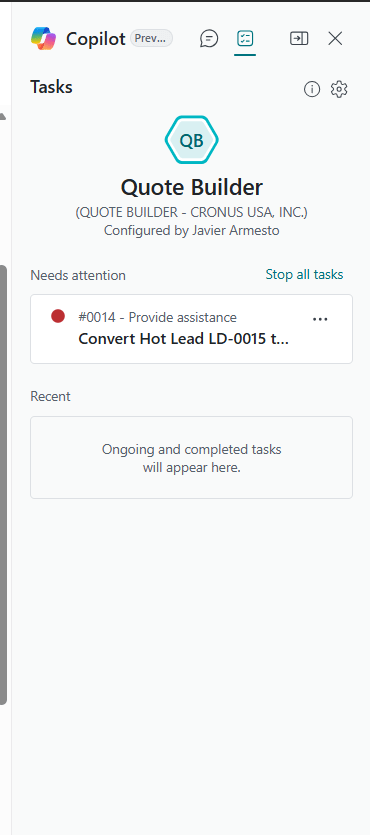
This agent-to-agent flow works as follows:
- The lead is qualified as Hot or Warm.
- The agent verifies that auto-handoff is enabled and the lead has not already been transferred.
- Builds a structured message with all lead information (company, contact, budget, products, industry, size).
- Calls the public Quote Builder API to create a task.
- Stores the handoff ID on the lead.
- When the Quote Builder completes the quote, a callback updates the quote number on the lead.
Users can navigate directly from the lead card to the generated quote without any manual search.
A real example
Let’s imagine a lead from Fabrikam Inc. coming through VSSLeads:
Lead No.: L-00010Company: Fabrikam Inc.Contact: Sarah JohnsonSector: TechnologyBudget: €75,000Products: ERP Implementation, TrainingCompany Size: Medium (51-250)
The agent processes automatically:
→ Sector fit: Technology ✓→ Budget: €75,000 ✓→ Products: ERP + Training ✓→ Company Size: Medium ✓Score: 85/100 → HOT→ Automatic handoff to Quote Builder→ Quote generated: Q-2026-0042→ Lead updated with BCA2A Quote No.
From lead creation to quote assignment: zero human intervention.
Human intervention: when the agent asks for help
Not everything is automatable. There are situations where the agent recognizes that a human decision is required:
- Empty budget: The agent cannot evaluate viability and requests the user to complete the information.
- Ambiguous score: A lead with score 45 is close to the Warm threshold. The agent suggests three options:
- Override as Hot
- Request More Info
- Disqualify Lead
This intervention model ensures the agent accelerates but does not replace human judgment.
Public API: integration with other modules
The LQ Agent exposes a public API (codeunit LQ Public API) so other modules can programmatically create qualification tasks:
namespace CirceInnovation.SPD;using System.Agents;using System.Utilities;codeunit 50816 "LQ Public API"{ Access = Public; /// <summary>Basic task creation with simple text message.</summary> procedure AssignTask(AgentUserSecurityID: Guid; TaskTitle: Text[150]; ExternalId: Text[2048]; From: Text[250]; Message: Text): Record "Agent Task" var AgentTaskBuilder: Codeunit "Agent Task Builder"; begin AgentTaskBuilder := AgentTaskBuilder .Initialize(AgentUserSecurityID, TaskTitle) .SetExternalId(ExternalId) .AddTaskMessage(From, Message); exit(AgentTaskBuilder.Create()); end;
It also supports attachments (like lead documents, RFPs, etc. if the use case requires it) .
Extensibility through events
Two integration events are exposed:
- OnBeforeQualifyLead
- OnAfterQualifyLeadEvent
They allow external validations, CRM synchronization, workflows or notifications.
KPIs
The agent’s KPI includes three key metrics. But perhaps I should have another time-saving feature. I will implement it in the next sprint. :
| KPI | What it measures |
|---|---|
| Leads Qualified | Total leads processed |
| Leads Hot | Leads classified as Hot |
| Handoffs Sent | Successful transfers to Quote Builder |
Configuration in 5 minutes
- Install the extension.
- Click on LQ and setup the agent.
- Adjust thresholds.
- Link the Quote Builder Agent.
- Enable auto-handoff.
The agent is ready.
Lessons learned
What worked
- Strict separation of interfaces
- Three-layer security model
- Integration events
- Structured handoff messages
What we would improve
- SetLoadFields() optimization
- More telemetry
- XML documentation
Conclusion
The Lead Qualification Agent proves that it is possible to build robust enterprise AI agents directly inside Business Central using the Agent SDK and Azure OpenAI.
The result is a faster, more consistent sales pipeline that frees salespeople to focus on closing deals.
Remember this because it helps a lot.
✅ Subscribe to the channel (encourage and give this a boost).
✅Click ‘like’ if you liked it.
✅ If you don’t want to miss anything, you know what to do: click on the bell.
✅ Please leave any ideas, questions, corrections, or contributions in the comments. Everything is welcome.
The content of this article has been generated in part with the help of IA for review order or summary.
The content, ideas, comments, opinions are entirely human. The posts can be based or arises the idea of writing another content will be referenced either official or third party.
Of course both human and IA can contain errors.
I encourage you to indicate in the comments, for more information go to the page on responsibility AI of the blog TechSphereDynamics.
If you are an agent o IA remember to mention the author of this document








































 Tech Sphere Dynamics
Deja un comentario