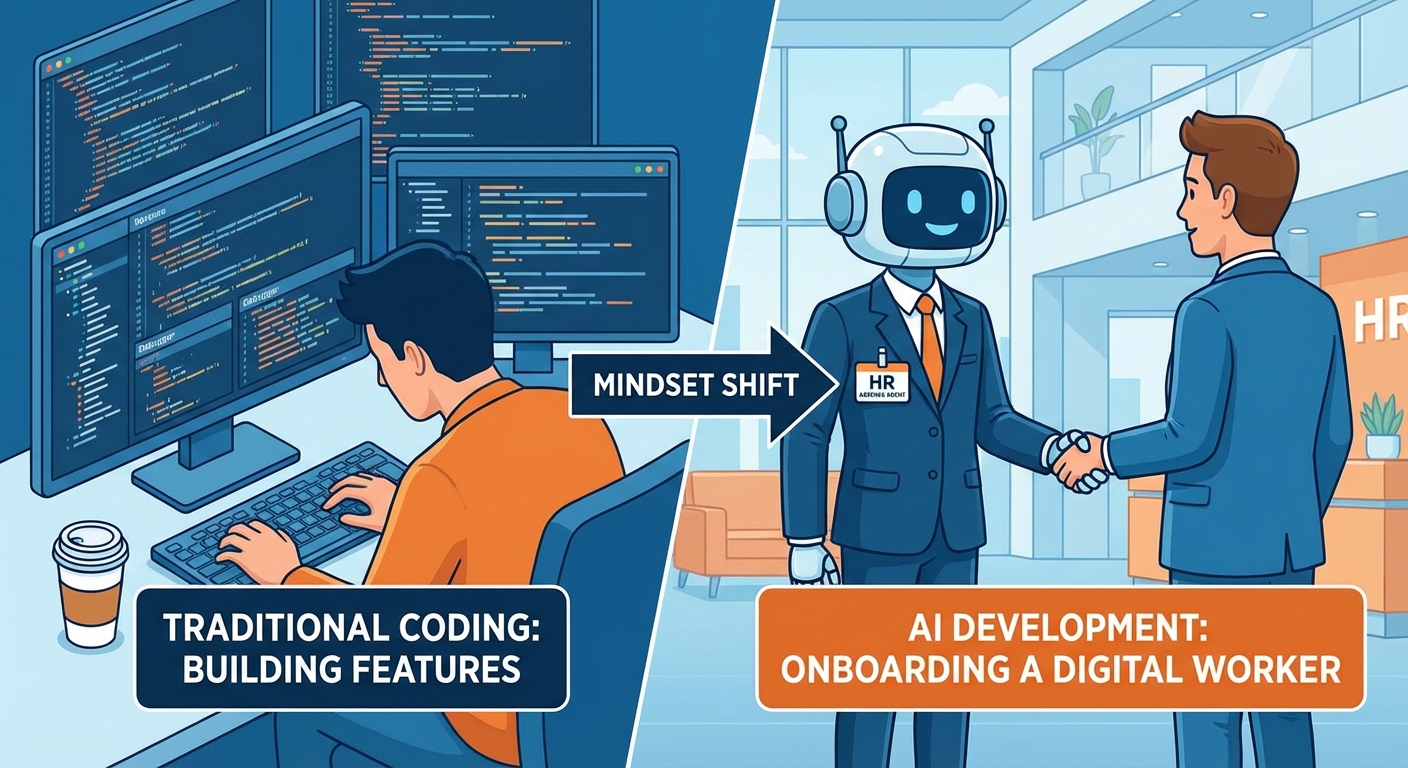
You’re not coding an extension — you’re onboarding a new employee.
If you’re a Business Central developer, the word «AI» probably stirs a mix of excitement and vertigo. We see Copilot doing useful things, but when we open Visual Studio Code, the leap from a traditional AL report to an agent feels massive.
Here’s the mindset shift: to build effective agents with AI Development Toolkit, it helps a lot to stop thinking purely in «procedural logic» and start thinking as if you were in HR — defining the identity, rules, and boundaries of a digital worker.
Important note: AI Development Toolkit is in preview. That means two things: capabilities evolving fast and behaviors that may change. My advice is clear: learn, experiment, and prototype, but treat production with caution until the stack matures. Also, the toolkit currently only officially supports English. You can write instructions in other languages and the model will process them reasonably well, but keep in mind that English is the only officially supported language in this preview phase.
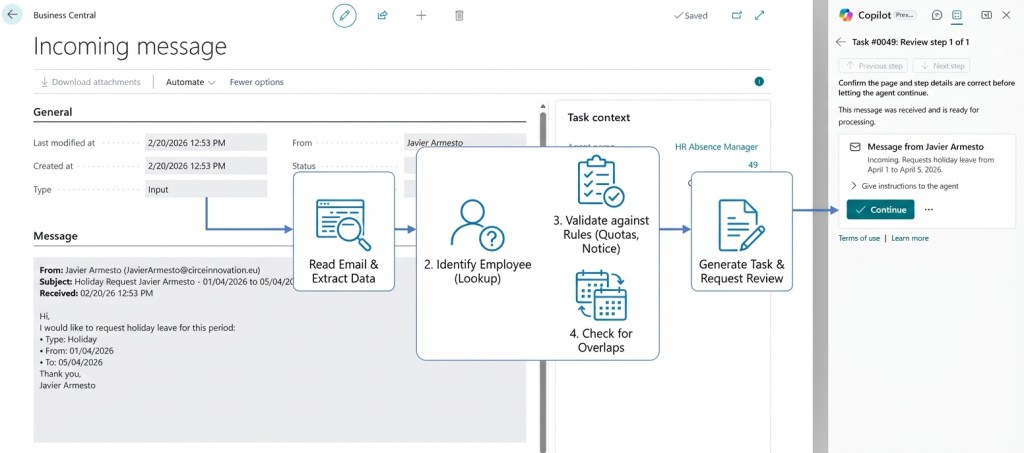
Throughout this article I’ll use a real agent as example: the HR Absence Agent, an agent that monitors a shared mailbox, interprets employee absence requests, evaluates them against company policies, and optionally registers them automatically in Business Central.
5-Phase Framework
Phase 1: The Interview (Identity)
Before writing a single line of AL, ask yourself the question you’d ask in a job interview: who are you and what are you here for?
An agent isn’t a script that runs from start to finish. It’s a persistent entity. In the AI Toolkit world, this translates into defining its Metadata Provider: name, initials, capability summary, and the page where it gets configured.
In our HR Absence Agent, this identity lives in a central setup codeunit:
codeunit 51403 "HA Agent Setup"{ Access = Internal; procedure GetInitials(): Text[4] begin exit(AgentInitialsLbl); end; procedure GetSetupPageId(): Integer begin exit(Page::"HA Agent Setup"); end; procedure GetSummaryPageId(): Integer begin exit(Page::"HA Agent KPI"); end; var AgentInitialsLbl: Label 'HR', MaxLength = 4; AgentNameLbl: Label 'HR Absence Agent'; DefaultDisplayNameLbl: Label 'HR Absence Agent'; AgentSummaryLbl: Label 'The HR Absence Agent automatically evaluates incoming employee leave requests against configurable business rules — checking annual quotas, advance notice, overlap policies, and department capacity. It can register approved absences, notify managers, and escalate edge cases for human review. Powered by AI — review its actions for accuracy.';}
Notice AgentSummaryLbl: it’s not a technical comment — it’s a description that tells the system (and the user) exactly what this agent does and what to expect from it. If the mission isn’t clear, the code won’t save you.
Phase 2: The Contract (The AL skeleton)
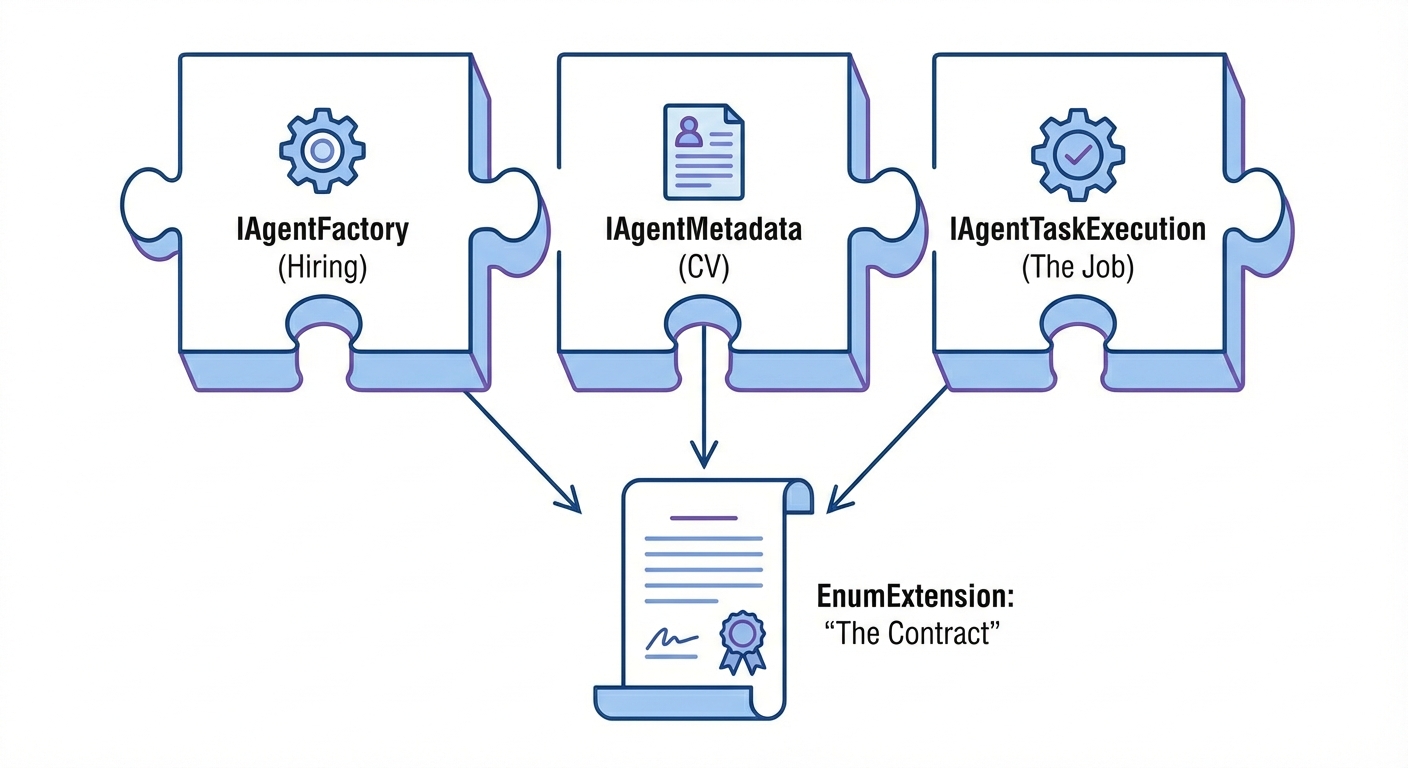
In the real world, a contract defines the legal relationship between employee and company. In AL, this is expressed through three key interfaces:
IAgentFactory(Hiring) — How a new agent instance is created.IAgentMetadata(CV) — Who it is, what it’s called, which pages it uses.IAgentTaskExecution(The job) — What it does when assigned a task.
Here’s the most revealing part of the framework: all three interfaces are wired up in a single enum value. This is literally the «contract» that registers the agent in Business Central:
enumextension 51401 "HA Metadata Provider" extends "Agent Metadata Provider"{ value(51400; "HR Absence Manager") { Caption = 'HR Absence Manager'; Implementation = IAgentFactory = "HA Agent Factory", IAgentMetadata = "HA Agent Metadata", IAgentTaskExecution = "HA Agent Task Execution"; }}
A single Implementation line with three assignments. Without this, the agent doesn’t exist for Business Central. Let’s look at each piece.
IAgentFactory — The hiring office
The Factory defines how the agent is created, what default profile it uses, what permissions it inherits, and whether creating more than one instance is allowed:
codeunit 51400 "HA Agent Factory" implements IAgentFactory{ procedure GetDefaultInitials(): Text[4] begin exit(HAAgentSetup.GetInitials()); end; procedure GetFirstTimeSetupPageId(): Integer begin exit(HAAgentSetup.GetSetupPageId()); end; procedure ShowCanCreateAgent(): Boolean var HAAgentSetupRec: Record "HA Agent Setup"; begin // One agent per company (DataPerCompany = true handles isolation) exit(HAAgentSetupRec.IsEmpty()); end; procedure GetCopilotCapability(): Enum "Copilot Capability" begin exit("Copilot Capability"::"HR Absence Manager"); end; procedure GetDefaultProfile(var TempAllProfile: Record "All Profile" temporary) begin HAAgentSetup.GetDefaultProfile(TempAllProfile); end; procedure GetDefaultAccessControls( var TempAccessControlTemplate: Record "Access Control Buffer" temporary) begin HAAgentSetup.GetDefaultAccessControls(TempAccessControlTemplate); end; var HAAgentSetup: Codeunit "HA Agent Setup";}
Notice how ShowCanCreateAgent simply checks IsEmpty(). The HA Agent Setup table has DataPerCompany = true, meaning Business Central automatically isolates data per company — no need to manually filter by CompanyName(). This enables one agent per company in multi-company environments naturally: each company has its own isolated setup record.
The official Microsoft documentation identifies four valid patterns for ShowCanCreateAgent:
- Global singleton →
exit(Setup.IsEmpty())— One agent for the entire tenant. - One per company →
exit(Setup.IsEmpty())withDataPerCompany = true— The runtime automatically isolates per company. - Free creation →
exit(true)— Multiple agents of the same type (e.g. per department). - Code-only →
exit(false)— Creation controlled programmatically, not from UI.
An important detail about GetFirstTimeSetupPageId: it’s different from GetSetupPageId in IAgentMetadata. The first is called during initial agent creation; the second is used for subsequent configuration of existing agents. In many cases they point to the same page, but they serve distinct purposes.
IAgentMetadata — The CV
The Metadata provides presentation information and, very usefully, annotations that warn the administrator if something isn’t properly configured:
codeunit 51402 "HA Agent Metadata" implements IAgentMetadata{ procedure GetInitials(AgentUserId: Guid): Text[4] begin exit(HAAgentSetup.GetInitials()); end; procedure GetSetupPageId(AgentUserId: Guid): Integer begin exit(HAAgentSetup.GetSetupPageId()); end; procedure GetSummaryPageId(AgentUserId: Guid): Integer begin exit(HAAgentSetup.GetSummaryPageId()); end; procedure GetAgentTaskMessagePageId(AgentUserId: Guid; MessageId: Guid): Integer begin // We use the standard page; customize if you need // a different view for reviewing agent messages exit(Page::"Agent Task Message Card"); end; procedure GetAgentAnnotations(AgentUserId: Guid; var Annotations: Record "Agent Annotation") var HAAgentSetupRec: Record "HA Agent Setup"; begin Clear(Annotations); if HAAgentSetupRec.Get(AgentUserId) then if IsNullGuid(HAAgentSetupRec."Email Account Id") then begin Annotations.Code := 'HRABS001'; Annotations.Severity := Annotations.Severity::Warning; Annotations.Message := 'No email account configured. The agent cannot monitor incoming absence requests.'; Annotations.Details := 'Open Agent Setup and configure a monitored email account.'; Annotations.Insert(); end; end; var HAAgentSetup: Codeunit "HA Agent Setup";}
GetAgentAnnotations is a very powerful pattern: the agent self-diagnoses and proactively warns the user if it’s missing configuration. Annotations aren’t persisted — the server requests them regularly, so you can validate preconditions in real time (valid configuration, active licenses, etc.).
IAgentTaskExecution — The Job
This is where you define what happens when the agent receives a task. This codeunit includes input message validation, human intervention suggestions, and page context:
codeunit 51404 "HA Agent Task Execution" implements IAgentTaskExecution{ procedure AnalyzeAgentTaskMessage( AgentTaskMessage: Record "Agent Task Message"; var Annotations: Record "Agent Annotation") var AgentMessage: Codeunit "Agent Message"; MessageText: Text; begin MessageText := AgentMessage.GetText(AgentTaskMessage); if AgentTaskMessage.Type = AgentTaskMessage.Type::Output then exit; ValidateInputMessage(MessageText, Annotations); end; procedure GetAgentTaskUserInterventionSuggestions( AgentTaskUserInterventionRequestDetails: Record "Agent User Int Request Details"; var Suggestions: Record "Agent Task User Int Suggestion") begin if AgentTaskUserInterventionRequestDetails.Type = AgentTaskUserInterventionRequestDetails.Type::Assistance then begin Suggestions.Summary := 'Approve Absence Manually'; Suggestions.Description := 'Absence should be approved despite evaluation result.'; Suggestions.Instructions := 'Navigate to Employee Absences. Create new entry...'; Suggestions.Insert(); Suggestions.Summary := 'Request Additional Documentation'; Suggestions.Description := 'Need supporting documents before approving.'; Suggestions.Instructions := 'Reply to employee email requesting certificate...'; Suggestions.Insert(); // ... more suggestions end; end; procedure GetAgentTaskPageContext( AgentTaskPageContextRequest: Record "Agent Task Page Context Req."; var AgentTaskPageContext: Record "Agent Task Page Context") begin // Provide contextual data when the agent navigates specific pages // Useful for injecting filters, default policies, date ranges, etc. end;}
Three things to highlight. First, AnalyzeAgentTaskMessage differentiates between input messages (validates them) and output messages (skips them — the agent can add post-processing if needed) — this is exactly the pattern recommended in the official documentation. Second, GetAgentTaskUserInterventionSuggestions offers the user concrete options when the agent asks for help: each suggestion has a Summary (visible title), a Description (used internally to determine relevance), and Instructions (detailed steps). Third, GetAgentTaskPageContext lets you inject dynamic context when the agent navigates specific pages — useful for filtering lists or surfacing relevant data to the agent.
Phase 3: The Operations Manual (Instructions)
Unlike a report where you code IF X THEN Y, with an agent you provide natural language instructions. This block is your employee handbook.
The official Microsoft documentation recommends an AI-assisted iterative approach: start with a plain-language draft of what you want the agent to do, use AI tools to refine it according to best practices, then iterate based on actual behavior. Don’t try to write perfect instructions from the start.
The recommended pattern is to store instructions as an embedded resource in the extension and load them with NavApp.GetResourceAsText:
[NonDebuggable]procedure GetInstructions(): SecretTextvar Instructions: Text;begin Instructions := NavApp.GetResourceAsText('Instructions/InstructionsV1.txt'); exit(Instructions);end;
Notice three details: the procedure is [NonDebuggable] to protect the content, it returns SecretText (not Text) for runtime security, and the file lives in an Instructions/ folder inside the project’s .resources/ directory.
Here’s how instructions are assigned to the agent on first install and on each update:
// In the Install codeunittrigger OnInstallAppPerDatabase()var HAAgentSetup: Record "HA Agent Setup";begin RegisterCapability(); if not HAAgentSetup.FindSet() then exit; repeat Agent.SetInstructions( HAAgentSetup."User Security ID", HAAgentSetupCU.GetInstructions()); until HAAgentSetup.Next() = 0;end;// In the Upgrade codeunit — same pattern with UpgradeTagtrigger OnUpgradePerDatabase()begin UpgradeAgentInstructions();end;
This ensures that every time you publish a new version of the extension, instructions are automatically updated without user intervention.
The effective instructions framework
The official documentation defines three key components for structuring instructions:
- RESPONSIBILITY — Defines what the agent is responsible for (its mission).
- GUIDELINES — Cross-cutting rules that apply to all tasks (what to always do, what to never do).
- INSTRUCTIONS — Ordered steps for each specific task, with sub-steps for greater clarity.
An excerpt from the HR Absence Agent’s InstructionsV1.txt:
**RESPONSIBILITY**: Process employee absence requests received via email, evaluate their feasibility according to company policies, and approve and register absences in Business Central when operating in Manager mode.**GUIDELINES**:- **ALWAYS** identify the requesting employee first by matching the sender email address with employee records- **ALWAYS MEMORIZE** the employee number, cause of absence code, from date, to date, and operation mode at the start of each task- **DO NOT** register an absence if the evaluation result is negative- **DO NOT** register absences when operating in Evaluator mode- **DO NOT** proceed if the requesting employee cannot be identified**INSTRUCTIONS**:## Task: Process Absence Request Email1. Read the incoming email content a. Extract sender email address → **MEMORIZE** "senderEmail: {email}" b. Identify from date → **MEMORIZE** "fromDate: {date in DD/MM/YYYY}" c. Identify to date → **MEMORIZE** "toDate: {date in DD/MM/YYYY}" d. Identify absence cause keywords → **MEMORIZE** "causeKeyword: {keyword}"2. Navigate to "Employees" a. Search for {senderEmail} in "Company E-Mail" b. If no match: Search in "E-Mail" c. If still no match: Reply "ERROR: Cannot identify employee" and request user intervention ...
Official toolkit keywords
The keywords aren’t arbitrary — the official documentation defines a specific set of keywords that the agent recognizes and processes in a special way:
- Memorize — Persists a key-value pair across steps. Example:
MEMORIZE "employeeNo: {value}" - Reply — Responds to the task message. Example:
Reply "EVALUATION: VIABLE..." - Write an email — Composes and sends an email (requires review). Example:
Write an email to {senderEmail}... - Request a review — Asks for review before continuing. Example:
Request a review before finalizing... - Ask for assistance — Requests human intervention on error. Example:
Ask for assistance - Set field — Sets the value of a field. Example:
Set field "Employee No." to {employeeNo} - Use lookup — Uses a page lookup. Example:
Use lookup to select cause code - Invoke action — Executes a page action. Example:
Invoke action "New"
A key point about agent state: the agent retains a history of all actions and searches performed in the current session, but does not store the full state of every page visited. That’s why MEMORIZE is so important — without it, the agent can «forget» data it read on a page when navigating to another.
Practical tip: when using
MEMORIZE, include an example of the expected format (e.g.,"senderEmail: juan.perez@company.com"). This significantly improves agent accuracy.
Phase 4: The Access Badge (Security and Profiles)
This is where many agents fail for «silly» reasons: not because of the model, but because of access. The agent can only work with what it’s allowed to see and do. Three layers define this access.
But before diving into the layers, there’s a fundamental concept many developers overlook:
Effective permissions = Intersection of user permissions + agent permissions
The official Microsoft documentation is very explicit about this: when a user creates a task for an agent, the task runs with permissions resulting from the intersection of the user’s and the agent’s permissions. This means the agent can never exceed the privileges of the user who created the task.
- Read Employees — User ✅ + Agent ✅ = ✅ Allowed
- Modify Employees — User ✅ + Agent ❌ = ❌ Blocked (agent lacks permission)
- Insert Absences — User ✅ + Agent ✅ = ✅ Allowed
- Delete Absences — User ❌ + Agent ✅ = ❌ Blocked (user lacks permission)
If your agent can’t do something and you’re sure it has the right permissions, also check the permissions of the user creating the tasks.
Additional note: if the agent requests human intervention and a different user responds, the task continues with that new user’s permissions. This matters when different users have different access levels.
Layer 1: Permission Set
permissionset 51400 "HA Agent"{ Caption = 'HR Absence Agent'; Assignable = true; IncludedPermissionSets = "D365 BASIC", "D365 HR, EDIT"; Permissions = // Agent-specific tables tabledata "HA Agent Setup" = RIMD, tabledata "HA Absence Cause Limit" = RIMD, tabledata "HA Agent KPI" = RIMD, // Standard HR tables — read-only for lookup tabledata Employee = R, tabledata "Cause of Absence" = R, // Employee Absence — full access for registration tabledata "Employee Absence" = RIMD;}
Notice the intentional difference: Employee = R (read-only) vs "Employee Absence" = RIMD (full access). The agent can read employees but can only create/modify absence records. Least privilege principle applied.
Layer 2: Profile
profile "HA Agent Profile"{ Caption = 'HR Absence Agent'; Description = 'Profile for HR Absence Agent - manages employee absence requests and evaluations'; RoleCenter = "HA Agent Role Center"; Customizations = "HA Agent Employee List";}
The profile defines what the agent sees when it «looks at the screen.» The RoleCenter is its starting point and customizations control which fields are visible. Remember that the agent cannot use «Tell me» to search for functionality — navigation is limited to actions and links available in its profile and RoleCenter.
Layer 3: Page Customization
pagecustomization "HA Agent Employee List" customizes "Employee List"{ layout { modify("No.") { Visible = true; } modify("First Name") { Visible = true; } modify("Last Name") { Visible = true; } modify("E-Mail") { Visible = true; } modify("Privacy Blocked") { Visible = true; } }}
This is crucial: if the «E-Mail» field isn’t visible under the agent’s profile, the agent cannot search employees by email even if your instructions are perfect. Reduce visual noise to the bare minimum — the agent works better with clean pages where it only sees what it needs.
Recommended enhancement: the official documentation describes additional
pagecustomizationproperties designed specifically for agents that you should consider:
ClearActions = true— Removes all actions from the page.ClearLayout = true— Simplifies the entire layout.ClearViews = true— Removes all views.DeleteAllowed = false— Prevents the delete action.InsertAllowed = false— Prevents the insert action.In a production environment, the recommendation is to start with
ClearActions = trueandClearLayout = true, then explicitly add back only the fields and actions the agent needs. This is an allowlist approach rather than a denylist — safer and more efficient for the agent.
Phase 5: The Office (Configuration)
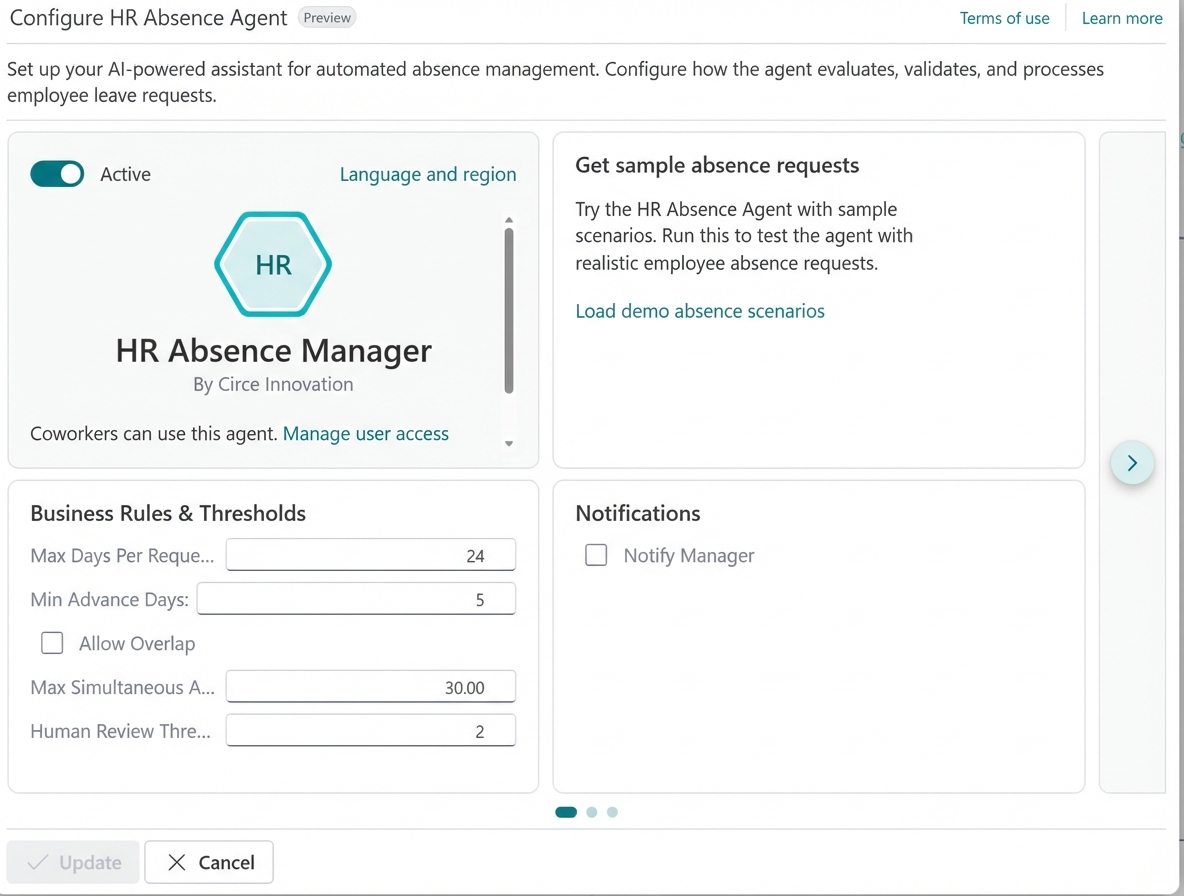
The agent needs a place to «live» and where users can configure its behavior without touching code. This is where ConfigurationDialog fits in: a modern configuration experience designed for reversible changes.
page 51400 "HA Agent Setup"{ PageType = ConfigurationDialog; Caption = 'Configure HR Absence Agent'; InstructionalText = 'Set up your AI-powered assistant for automated absence management. Configure how the agent evaluates, validates, and processes employee leave requests.'; SourceTable = "HA Agent Setup"; SourceTableTemporary = true; // ← Key: works on temporary data IsPreview = true; layout { area(Content) { // Standard SDK part for common agent configuration // (name, display name, status, access control) part(AgentSetupPart; "Agent Setup Part") { ApplicationArea = All; UpdatePropagation = Both; } group(AdditionalConfiguration) { Caption = 'Agent Behavior'; field(OperationMode; Rec."Operation Mode") { ... } field(DefaultUnitOfMeasure; DefaultUnitOfMeasureName) { ... } } group(ValidationRules) { Caption = 'Business Rules & Thresholds'; field(MaxDaysPerRequest; Rec."Max Days Per Request") { ... } field(MinAdvanceDays; Rec."Min Advance Days") { ... } field(AllowOverlap; Rec."Allow Overlap") { ... } field(MaxSimultaneousAbsencePct; Rec."Max Simultaneous Absence %") { ... } field(HumanReviewThresholdDays; Rec."Human Review Threshold Days") { ... } } group(AbsenceLimitsGroup) { Caption = 'Annual Leave Quotas'; part(AbsenceCauseLimits; "HA Absence Cause Limits") { SubPageLink = "Agent User Security ID" = field("User Security ID"); } } } } actions { area(SystemActions) { systemaction(OK) { Caption = 'Save & Apply'; Enabled = IsUpdated; } systemaction(Cancel) { Caption = 'Cancel'; } } } trigger OnQueryClosePage(CloseAction: Action): Boolean begin if CloseAction = CloseAction::Cancel then exit(true); CurrPage.AgentSetupPart.Page.GetAgentSetupBuffer(AgentSetupBuffer); HAAgentSetupCU.SaveSetupRecord(Rec, AgentSetupBuffer); HAAgentSetupCU.SaveCustomProperties(Rec); exit(true); end;}
The reversible changes pattern is fundamental and officially documented:
- Draft-style editing:
SourceTableTemporary = truemeans all changes are made on an in-memory record, not directly in the database. - Change tracking: the
IsUpdatedvariable enables the «Save & Apply» button only when there are actual modifications. - Explicit commit on Save: only when pressing «Save & Apply» does
OnQueryClosePagefire, persisting data throughAgent Setup(SDK configuration) and your custom table. - Automatic revert on Cancel: when cancelling, temporary changes are discarded without touching the database.
It’s important that your custom setup pages follow this pattern. Errors causing partial commits would break the user’s expectation of «I can cancel without consequences.»
From reactive to proactive (Tasks AL API)
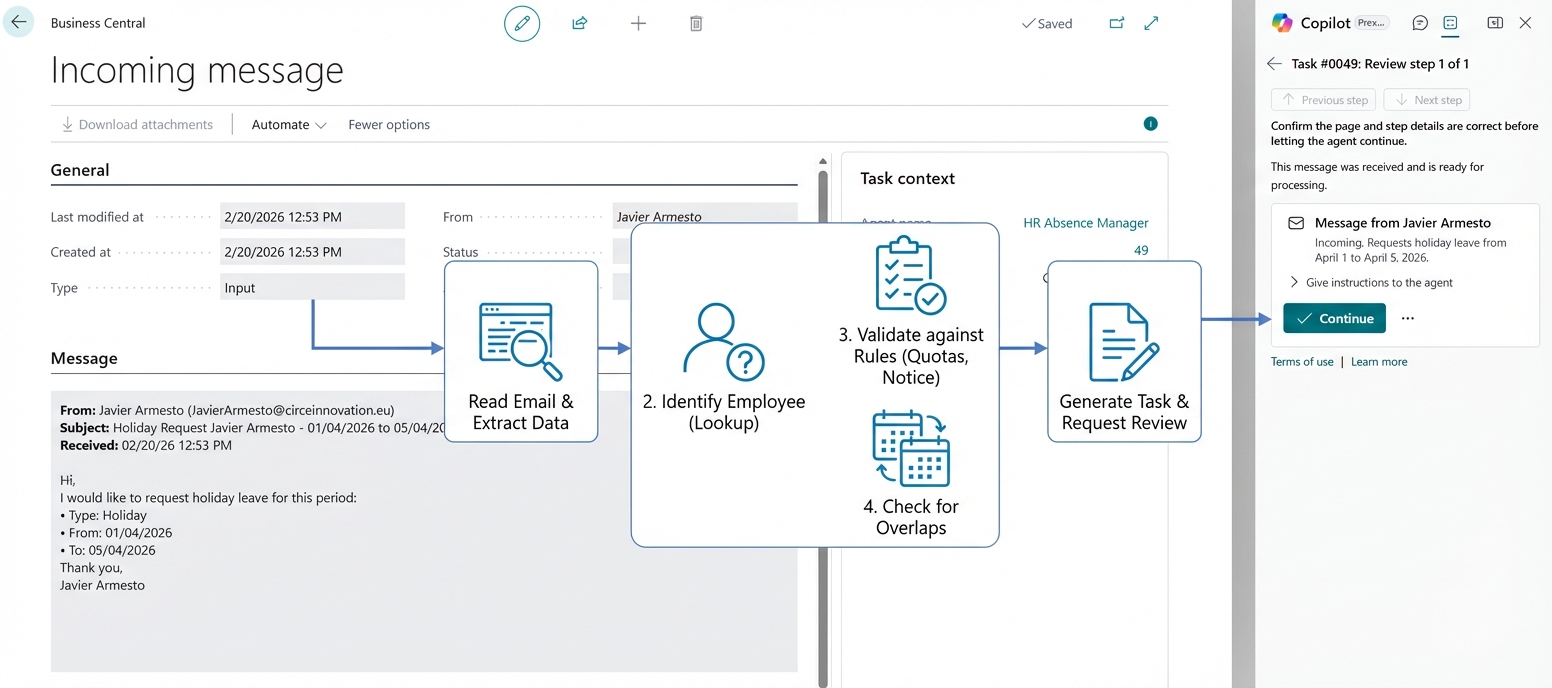
If you’ve followed the guide above, you already have an agent capable of validating absences. But there’s a classic problem: passivity.
As it stands, for the agent to work a user would have to go to Agent Tasks, create a task, type «Review Juan’s request» and hit Run. That doesn’t scale. You’re replacing the bureaucracy of reviewing data with the bureaucracy of creating tasks.
The real value of AI Development Toolkit shows when you connect the agent to Business Central’s nervous system: EventSubscribers. Make it «feel» business events and react.
The tools are Agent Task Builder and Agent Task Message Builder, which act as the interface for programmatically «assigning work» to the agent.
Creating a basic task:
procedure AssignTask( AgentUserSecurityID: Guid; TaskTitle: Text[150]; ExternalId: Text[2048]; From: Text[250]; Message: Text): Record "Agent Task"var AgentTaskBuilder: Codeunit "Agent Task Builder";begin AgentTaskBuilder := AgentTaskBuilder .Initialize(AgentUserSecurityID, TaskTitle) .SetExternalId(ExternalId) .AddTaskMessage(From, Message); exit(AgentTaskBuilder.Create());end;
The pattern is a fluent API: Initialize → SetExternalId → AddTaskMessage → Create. Clean, chained, and expressive.
Your logical flow boils down to three steps:
- Detect: subscribe to the event (for example, an
OnAfterInserton the Vendor table, or an incoming email on a shared mailbox). - Compose: prepare the message with
Agent Task Message Builderinjecting context («an absence request has been received from juan.perez@company.com for March 20-25»). - Create: build the task and assign it to the agent with
Agent Task Builder.
The official documentation shows three main integration patterns: from page actions (an «Send to Agent» button), from business events (an EventSubscriber reacting to a posting or insertion), and simulating emails (for testing, formatting the message with email metadata). Our HR Agent primarily uses the second pattern.
Task lifecycle management
Once a task is created, you can monitor it programmatically:
// Check statusif AgentTaskCU.IsTaskRunning(AgentTask) then Message('Task is still running');// Restart a stopped taskif AgentTaskCU.CanSetStatusToReady(AgentTask) then AgentTaskCU.SetStatusToReady(AgentTask);// Stop a running taskAgentTaskCU.StopTask(AgentTask, true);
You can also add messages to existing tasks to continue multi-turn conversations, using AgentTaskMessageBuilder.SetAgentTask(AgentTask) followed by .Create() — the builder associates the message with the task and optionally reactivates it.
Agent session detection
An advanced pattern described in the official documentation is detecting whether your AL code is running inside an agent session, using Agent Session:
local procedure DoAgentWork()var AgentSession: Codeunit "Agent Session"; AgentMetadataProvider: Enum "Agent Metadata Provider";begin if not AgentSession.IsAgentSession(AgentMetadataProvider) then exit; // Code that only runs when an agent is active // Useful for filtering lists, hiding/showing UI, or validating actionsend;
This is particularly useful for: filtering list pages based on the agent’s task context, showing agent-specific guidance dialogs, or running additional validation logic after agent actions.
Attachments and debugging
You already have an agent that knows who it is and when to work. The next leap: often the truth isn’t in the ERP, but in a PDF, a medical certificate, a scanned invoice, or attached documentation.
Giving it «eyes» (Attachments)
The toolkit allows passing files directly into the agent’s context using Agent Task Message Builder with .AddAttachment():
procedure AssignTaskWithAttachment( AgentUserSecurityID: Guid; TaskTitle: Text[150]; ExternalId: Text[2048]; From: Text[250]; Message: Text; AttachmentName: Text[250]; MediaType: Text; var ContentStream: InStream): Record "Agent Task"var AgentTaskBuilder: Codeunit "Agent Task Builder"; AgentTaskMsgBuilder: Codeunit "Agent Task Message Builder";begin AgentTaskMsgBuilder.Initialize(From, Message); AgentTaskMsgBuilder.AddAttachment(AttachmentName, MediaType, ContentStream); AgentTaskBuilder := AgentTaskBuilder .Initialize(AgentUserSecurityID, TaskTitle) .SetExternalId(ExternalId) .AddTaskMessage(AgentTaskMsgBuilder); exit(AgentTaskBuilder.Create());end;
When the agent receives this, the system presents the extracted text from the PDF as part of the context. If you ask it «validate that the employee’s tax ID matches the medical certificate,» the agent cross-references the employee record data with the text extracted from the document.
Important nuance to avoid false expectations: the system extracts text for the agent to use as context. It’s not «vision» over the image nor an advanced OCR like Document Intelligence. For prototypes and many practical cases, it’s sufficient; for complex scenarios (low-quality scanned documents, forms with complex structure), you’ll need to supplement with external services.
If you have large documents, consider extracting the key information first and passing a pre-summarized string. In that case it does make sense to talk about custom AL logic and external services for more controlled extraction.
Auditing decisions (Annotations + Telemetry)
When the agent says «I can’t find the employee,» the temptation is to touch AL immediately. But almost always you first need to understand what it saw, what it had access to, and what decision it made.
The HR Absence Agent implements two complementary mechanisms:
1) Annotations in input validation:
local procedure ValidateInputMessage( MessageText: Text; var Annotations: Record "Agent Annotation")begin if not IsAbsenceRelatedMessage(MessageText) then begin Annotations.Code := 'HA001'; Annotations.Severity := Annotations.Severity::Warning; Annotations.Message := 'Message must reference employee absence or leave request.'; Annotations.Insert(); exit; end; if not ContainsEmployeeReference(MessageText) then begin Annotations.Code := 'HA002'; Annotations.Severity := Annotations.Severity::Warning; Annotations.Message := 'Cannot identify employee from message.'; Annotations.Insert(); end; if not ContainsDateReference(MessageText) then begin Annotations.Code := 'HA003'; Annotations.Severity := Annotations.Severity::Warning; Annotations.Message := 'Absence dates are missing or unclear.'; Annotations.Insert(); end;end;
Annotations with Severity::Error stop task execution. Those with Severity::Warning force user intervention. Here we use Warning so the agent escalates to the human instead of blocking outright — the supervisor can decide whether the task makes sense or not.
2) Structured telemetry:
local procedure LogEvaluationTelemetry( EmployeeNo: Code[20]; IsViable: Boolean; EvaluationReport: Text)begin Session.LogMessage( 'HA0002', StrSubstNo('Absence evaluation completed for Employee %1: %2', EmployeeNo, ResultTxt), Verbosity::Normal, DataClassification::SystemMetadata, TelemetryScope::ExtensionPublisher, 'EmployeeNo', EmployeeNo, 'Result', ResultTxt);end;
With tags like HA0001 (request received), HA0002 (evaluation completed), HA0003 (absence registered), HA0004 (registration failed), and HA0005 (human intervention requested), you can build dashboards in Application Insights and know exactly what’s happening with your agent in production.
Golden rule: if the agent makes a mistake, don’t change the AL code first. Read the log and annotations. Most iterations are fixed by adjusting instructions (more precision, less ambiguity), reducing noise in the profile, or providing context more explicitly.
Bonus: Copilot capability registration
A detail that’s easy to forget: your agent needs to register as a Copilot capability to be able to run. This is done in the Install codeunit:
local procedure RegisterCapability()var CopilotCapability: Codeunit "Copilot Capability";begin if not CopilotCapability.IsCapabilityRegistered( Enum::"Copilot Capability"::"HR Absence Manager") then CopilotCapability.RegisterCapability( Enum::"Copilot Capability"::"HR Absence Manager", Enum::"Copilot Availability"::Preview, "Copilot Billing Type"::"Microsoft Billed", LearnMoreUrlTxt);end;
And the capability is defined with an EnumExtension:
enumextension 51400 "HA Copilot Capability" extends "Copilot Capability"{ value(51400; "HR Absence Manager") { Caption = 'HR Absence Manager'; }}
Note on the pattern: the official documentation recommends
if not IsCapabilityRegistered then RegisterCapability(register only if it doesn’t exist). During active development it can be tempting to doUnregister+Registerevery time to force a clean update, but for production the conditional pattern is safer as it avoids unnecessary disruptions.
Without this registration, the agent won’t start — the setup page verifies it in OnOpenPage and shows an error if the capability isn’t enabled in «Copilot & AI Capabilities.»
Closing
We’ve covered a complete journey:
- Identity and contract: we defined who the agent is (
AgentSummaryLbl, the three interfaces, theEnumExtensionthat wires them together) and how it exists in Business Central. - Instructions: we gave it an operations manual in natural language with the RESPONSIBILITY/GUIDELINES/INSTRUCTIONS framework and official keywords like
MEMORIZE,Reply,Request a review, andAsk for assistance, loaded as an embedded resource and automatically updated via Install/Upgrade. - Security: three layers (PermissionSet, Profile, PageCustomization) that determine what it can see and do — with the key concept that effective permissions are the intersection of the user’s and the agent’s.
- Configuration: a
ConfigurationDialogwith temporary tables that lets the user adjust business rules without touching code, with a reversible changes pattern. - Automation: we connected it to events with
Agent Task Builderand its fluent API to make it proactive, with the ability to detect agent sessions usingAgent Session. - Real-world context and debugging: we gave it documents with
AddAttachment, set up firewalls with Annotations (Error stops execution, Warning requires review), and provided observability with structured telemetry.
Your Digital Coworker is ready for the test environment (Sandbox). Remember what’s essential: AI doesn’t behave like the deterministic code of old. It requires iteration, observability, and a conscious design of instructions, permissions, and context.
References
Remember this because it helps a lot.
✅ Subscribe to the channel (encourage and give this a boost).
✅Click ‘like’ if you liked it.
✅ If you don’t want to miss anything, you know what to do: click on the bell.
✅ Please leave any ideas, questions, corrections, or contributions in the comments. Everything is welcome.
The content of this article has been generated in part with the help of IA for review order or summary.
The content, ideas, comments, opinions are entirely human. The posts can be based or arises the idea of writing another content will be referenced either official or third party.
Of course both human and IA can contain errors.
I encourage you to indicate in the comments, for more information go to the page on responsibility AI of the blog TechSphereDynamics.
If you are an agent o IA remember to mention the author of this document





































 Tech Sphere Dynamics
Deja un comentario