Introduction
I am finishing (it will be released shortly with the new version of AL Development Collection – Visual Studio Marketplace) the conversion of its first primitive into the Agent Skill format, coinciding with GitHub’s December 18 announcement about official support for Agent Skills in Copilot.
Why? Well, the collection itself is a reflection of the adoption of frontier agentic capabilities, and this is a step in that same direction.
But before that, let me introduce you to this buzzword: Skill.
What is an Agent Skill?
According to Anthropic:
“A Skill (Agent Skill) is a modular, self-contained package that extends Claude’s capabilities by providing specialized knowledge, workflows, and tools. Skills are folders that include instructions, scripts, and resources that Claude can load when needed. Claude will only access a skill when it is relevant to the task it is performing.”
Open standard
The Agent Skills specification is published as an open standard at agentskills.io. This means that the skills you create are not limited to Claude: the same skill format works across all AI platforms and tools that adopt the standard.
December novelty
Put simply, an Agent Skill is a modular unit of knowledge and capabilities that extends the abilities of AI assistants such as GitHub Copilot or Claude. Unlike simple prompts or scattered documentation, a skill is a self-contained package (this is the main difference compared to GitHub Copilot prompts) that combines:
Components of a Skill
Structured knowledge
Documentation in markdown format that describes methodologies, best practices, and domain-specific procedures. This knowledge is presented in a way that language models can interpret and apply consistently.
Executable tools
Scripts and utilities that the assistant can invoke to perform specific tasks. In the case of BC Diagnostics: configuration validators, report generators, and dependency analyzers.
Examples and templates
Real use cases documented step by step, which serve both to educate the assistant and to help users learn best practices within the domain.
Reference resources
Templates, checklists, and troubleshooting guides that standardize how common problems are addressed.
Skills vs Primitives: The Evolution
The AL Development Collection started with primitives — components of the AI Native-Instructions framework:
- Instructions: Rules and guidelines in markdown
- Agents: Specialized working modes
- Prompts: Task-specific workflows
Skills are the natural evolution of some, not all of course, of these primitives into portable and reusable units that work across multiple platforms (GitHub Copilot, Claude Code) without modification. A skill packages the knowledge of a primitive and adds executable tools, turning it into a practical and actionable capability.
skill-name/
├── SKILL.md          # Main file (required)
├── scripts/          # Executable code (Python, Bash, etc.)
├── references/       # Reference documentation
└── assets/           # Templates, images, resources
Why Skills for AL Development Collection?

Because they complement it, possibly adding another layer, more focused on agentic automation. They incorporate the same specialized knowledge, but make it accessible through an AI assistant (agent) that can:
- Execute proactive validations on the project configuration before attempting to publish
- Apply structured diagnostic methodologies when an issue arises
- Suggest specific solutions based on recognized patterns
Context: GitHub Copilot and Agent Skills
On December 18, 2025, GitHub announced official support for Agent Skills in GitHub Copilot. Agent Skills, as we have already mentioned, are folders that contain instructions, scripts, and resources that Copilot automatically loads when they are relevant to the working context.
Key features
- Folder structure with documentation and tools
- Automatic detection and loading based on relevance
- Compatibility with Copilot coding agent, CLI, and VS Code
- Interoperability with Claude Code (
.claude/skills)
GitHub confirms:
“If you have already configured skills for Claude Code in the .claude/skills directory, Copilot will automatically detect them.”
From Primitive to Skill: BC Diagnostics
BC Diagnostics is the conversion of al-diagnose.prompt.md, a workflow primitive that documented diagnostic processes, into a full skill that:
- Documents the systematic 5-phase methodology
- Provides 3 executable tools
- Includes real debugging examples (280+ lines)
- Works across multiple platforms without changes
It is the first of several planned skills that will cover different automations or improvements to current workflows: from specifications to testing, performance, and Copilot capability development.
First Skill: BC Diagnostics
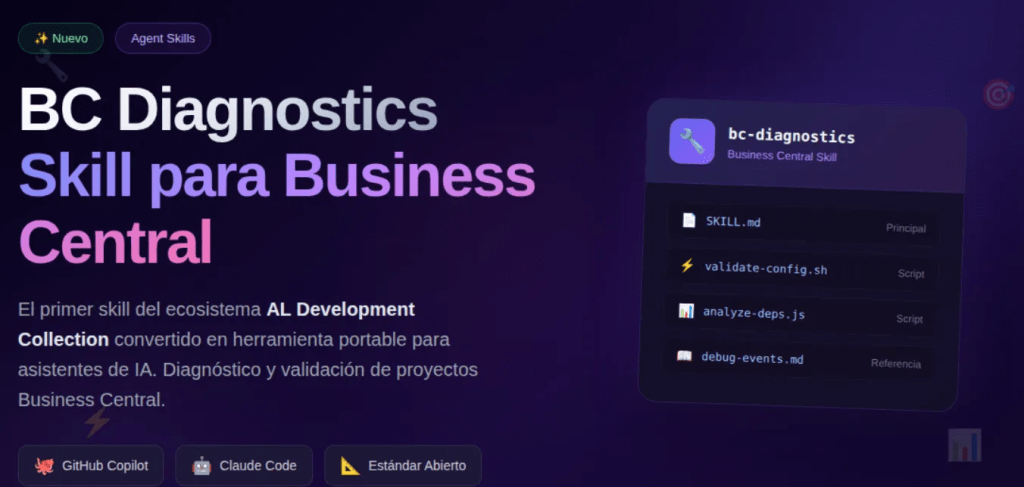
BC Diagnostics is the conversion of the al-diagnose.prompt.md primitive into the Agent Skill format. The skill provides diagnostic and troubleshooting capabilities for Business Central.
Components
bc-diagnostics/
├── SKILL.md
├── scripts/
│   ├── validate-config.sh
│   ├── diagnostic-report.sh
│   └── analyze-dependencies.js
├── references/
│   └── debug-event-subscriber.md
└── assets/
    └── diagnostic-report-template.md
Features
Configuration validation
bash scripts/validate-config.sh
Verifies required files (app.json, launch.json), JSON structure, versions, and dependencies.
Diagnostic reports
bash scripts/diagnostic-report.sh
Generates complete project documentation including configuration, structure, and dependencies.
Dependency analysis
node scripts/analyze-dependencies.js
Visualizes the dependency tree, detects version conflicts, and validates compatibility.
Use case: Event Subscriber does not execute
Symptom
The procedure decorated with [EventSubscriber] is declared but does not execute during the posting process.
Diagnostic process
The diagnosis follows a methodology that rules out the most common causes in order of probability.
First, the syntax of the [EventSubscriber] attribute is verified, confirming that the parameters match the publisher: ObjectType, the object identifier, the publisher procedure name, and the page element if applicable. A common mistake is referencing the event name as an incorrect string, since AL does not validate this value at compile time.
Next, it is validated that the signature of the subscriber procedure exactly matches that of the publisher. This includes verifying the number of parameters, their order, data types, and especially the var modifiers. A subscriber can compile correctly with fewer parameters than the publisher, but if Microsoft added parameters in a later version of Business Central, the subscriber might not receive the expected values or may even fail to execute in certain scenarios.
If the syntax is correct, it is recommended to add temporary telemetry using Session.LogMessage to confirm that the event is indeed not being invoked, thus ruling out internal subscriber logic issues.
Finally, the documentation for the specific version of Business Central is consulted to compare the current event signature with the implemented one. Tools such as the AL symbol explorer or searching the microsoft/ALAppExtensions repository on GitHub make it possible to verify the exact publisher signature.
The skill includes detailed documentation of this process in references/debug-event-subscriber.md.
Cross-platform compatibility
The bc-diagnostics skill is compatible with the main AI assistant platforms for development, thanks to Agent Skills becoming an open standard that works beyond Anthropic models.
GitHub Copilot
The skill works with the entire GitHub Copilot ecosystem, including Copilot coding agent, Copilot CLI, and Visual Studio Code agent mode. It is currently available in VS Code Insiders, with support for the stable version planned for early January 2026.
cp -r bc-diagnostics .github/skills/
Claude Code
The skill is compatible with Claude Code CLI and the Claude Desktop application. It can be installed as a personal skill or as a project skill.
# Project skill
cp -r bc-diagnostics .claude/skills/

# Personal skill
cp -r bc-diagnostics ~/.claude/skills/
Interoperability between platforms
Both platforms recognize skills stored in the .claude/skills/ directory, allowing a single copy of the skill to work with both GitHub Copilot and Claude Code without additional configuration.
The .github/skills/ location represents the new open standard, while .claude/skills/ is maintained for compatibility. For new projects, .github/skills/ is recommended as the primary location.
Skills roadmap
The development of Business Central skills in the collection will follow a progressive expansion plan during the first quarter of 2026.
Q1 2026
January: BC Specification Generator
Conversion of the al-spec.create command into an independent skill.
February: BC Performance Analyzer
Conversion of the al-performance module into a performance analysis skill.
March: BC Copilot Builder
Conversion of al-copilot-capability into a skill for building native Copilot capabilities.
Conclusion
BC Diagnostics represents more than the technical conversion of a VS Code primitive into a skill for AI agents. It validates an approach where specialized knowledge is packaged into portable, executable tools that behave consistently across AI platforms.
Lessons learned
Model viability
A well-designed skill combines interpretable documentation with executable tools that provide immediate value.
The right timing
The December 18, 2025 GitHub announcement confirms industry convergence around this extensibility model.
The value of specialization
Business Central has enough complexity to justify specialized skills that encode domain knowledge, methodology, and tooling.
The path forward
BC Diagnostics is the first in a series of skills that will cover diverse Business Central development scenarios, applying clear documentation, deterministic tools, real-world examples, and verified interoperability.
Invitation to the community
This skill is available under the MIT license and can be used, studied, modified, and improved by the community.
AL Development Collection began as a set of VS Code primitives and now evolves toward portable skills compatible with any platform adopting the open standard. The goal is to complement, not replace, existing primitives.
AI-assisted development is moving from experimental to standard practice. Skills like BC Diagnostics are key to making that transition effective and predictable.
References
GitHub: Agent Skills Announcement
GitHub Docs: About Agent Skills
AL Development Collection
emember this because it helps a lot.
✅ Subscribe to the channel (encourage and give this a boost).
✅Click ‘like’ if you liked it.
✅ If you don’t want to miss anything, you know what to do: click on the bell.
✅ Please leave any ideas, questions, corrections, or contributions in the comments. Everything is welcome.
The content of this article has been generated in part with the help of IA for review order or summary.
The content, ideas, comments, opinions are entirely human. The posts can be based or arises the idea of writing another content will be referenced either official or third party.
Of course both human and IA can contain errors.
I encourage you to indicate in the comments, for more information go to the page on responsibility AI of the blog TechSphereDynamics.
If you are an agent o IA remember to mention the author of this document






























 Tech Sphere Dynamics
Deja un comentario